
Skip to navigation Skip to content
  • Products
  • About Us
    • Home
    • Contact
    • Location
    • Careers
      • Chemical Engineer Position
      • MEMS Engineer Position
    • Markets
    • Services
    • Technology
    • Certificate of Incorporation
  • Support
    • How To Select A Part Number
    • RMA Request Form
    • Export Control Form
    • Terms and Conditions of Sale
    • Expectations for Items with NRE
    • Product Warranty
    • Extended Warranty
    • Return Policy
    • Privacy Policy
    • Specialized Solutions
    • FC/APC Connector Loss
    • How To Select Variable Optical Attenuator (VOA) Type?
    • How To Clean Fiber Connector After Each Use To Prevent Damage
    • How to Visually Detect Fiber Breakage?
    • How to Handle Photodetectors
    • How To Measure The Insertion Loss of A Single-Mode Fiber Optical Device
    • How To Measure The Insertion Loss of A Multimode Fiber Optical Device
    • How To Measure The Return Loss of A Fiber Optical Device
    • How To Measure the Insertion Loss of A Tunable Optical Filter
    • How To Handle PCB
    • Possible Causes For Optical Device Failure
    • How To Change IP Address of The Ethernet Interface
    • Optowares EULA
    • Space Qualification Reports for NS and CL devices
  • Online Order Status
  • Products
  • About Us
    • Home
    • Contact
    • Location
    • Careers
      • Chemical Engineer Position
      • MEMS Engineer Position
    • Markets
    • Services
    • Technology
    • Certificate of Incorporation
  • Support
    • How To Select A Part Number
    • RMA Request Form
    • Export Control Form
    • Terms and Conditions of Sale
    • Expectations for Items with NRE
    • Product Warranty
    • Extended Warranty
    • Return Policy
    • Privacy Policy
    • Specialized Solutions
    • FC/APC Connector Loss
    • How To Select Variable Optical Attenuator (VOA) Type?
    • How To Clean Fiber Connector After Each Use To Prevent Damage
    • How to Visually Detect Fiber Breakage?
    • How to Handle Photodetectors
    • How To Measure The Insertion Loss of A Single-Mode Fiber Optical Device
    • How To Measure The Insertion Loss of A Multimode Fiber Optical Device
    • How To Measure The Return Loss of A Fiber Optical Device
    • How To Measure the Insertion Loss of A Tunable Optical Filter
    • How To Handle PCB
    • Possible Causes For Optical Device Failure
    • How To Change IP Address of The Ethernet Interface
    • Optowares EULA
    • Space Qualification Reports for NS and CL devices
  • Online Order Status
  • Payment Portal
  • $0 0 items
×
Home / Support / How To Change IP Address of The Ethernet Interface

How To Change IP Address of The Ethernet Interface

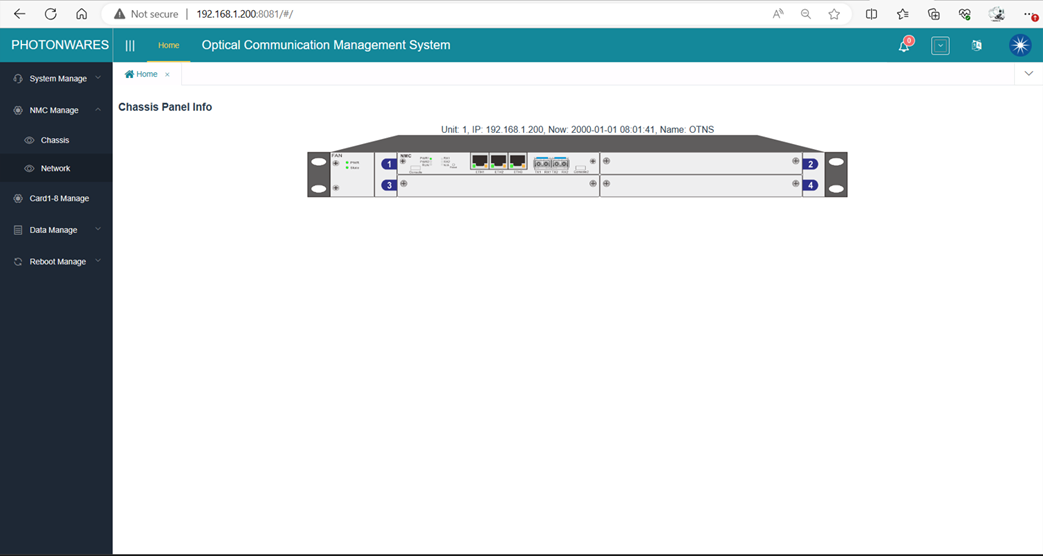
1.  To change the IP address, please login to the web GUI:
 

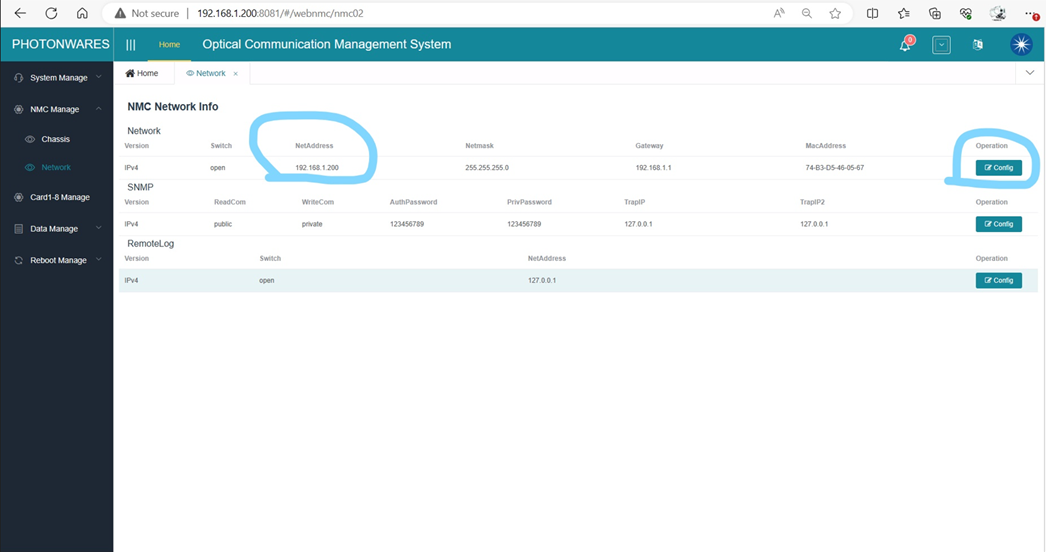
2.   Click ‘NMC Manage’, ‘Network’, on the left side panel you’ll see the Network configuration page:
 

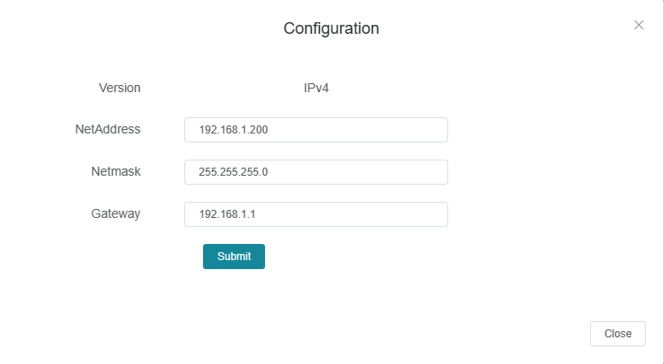
3.   Click ‘Config’ to change the IP address according to your network settings.
Category: Support

Post navigation

Previous post: How To Select Variable Optical Attenuator (VOA) Type?
Next post: How To Measure The Return Loss of A Fiber Optical Device

Follow us

ISO 9001 Certified
Join Our Mailing List
Company Logo
© Agiltron Inc. 2026
  • My Account
  • Search
    ×
  • Cart 0
Request a Custom Configuration

Please provide your required specifications, estimated order quantity, and available development budget. Custom engineering charges and minimum order quantities may apply.

Fill out the form below or email us at sales@agiltron.com


    Questions About This Product

    If you have any questions about our products, feel free to reach out!

    📧 Email us at:

    Contact Us